public static function FlexibleSpace():
void;
public static void FlexibleSpace();
Description
Insert a flexible space element.
Flexible spaces use up any leftover space in a layout.
Note: This will override the GUILayout.ExpandWidth and GUILayout.ExpandHeight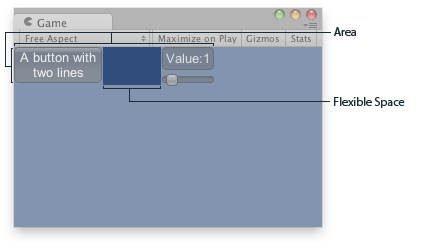
Flexible Space in a GUILayout Area.
    var sliderValue : float = 1.0;

    function OnGUI() {
        // Wrap everything in the designated GUI Area
        GUILayout.BeginArea (Rect (0,0,200,60));
        // Begin the singular Horizontal Group
        GUILayout.BeginHorizontal();
        // Place a Button normally
        GUILayout.RepeatButton ("A button with\ntwo lines");
        // Place a space between the button and the vertical area
        // so it fits the whole area
        GUILayout.FlexibleSpace();
        // Arrange two more Controls vertically beside the Button
        GUILayout.BeginVertical();
        GUILayout.Box("Value:" + Mathf.Round(sliderValue));
        sliderValue = GUILayout.HorizontalSlider (sliderValue, 0.0, 10);

        // End the Groups and Area
        GUILayout.EndVertical();
        GUILayout.EndHorizontal();
        GUILayout.EndArea();
    }
using UnityEngine;
using System.Collections;

public class ExampleClass : MonoBehaviour {
    public float sliderValue = 1.0F;
    void OnGUI() {
        GUILayout.BeginArea(new Rect(0, 0, 200, 60));
        GUILayout.BeginHorizontal();
        GUILayout.RepeatButton("A button with\ntwo lines");
        GUILayout.FlexibleSpace();
        GUILayout.BeginVertical();
        GUILayout.Box("Value:" + Mathf.Round(sliderValue));
        sliderValue = GUILayout.HorizontalSlider(sliderValue, 0.0F, 10);
        GUILayout.EndVertical();
        GUILayout.EndHorizontal();
        GUILayout.EndArea();
    }
}